How to Remove Gemini Watermark Online Free | GeminiErase
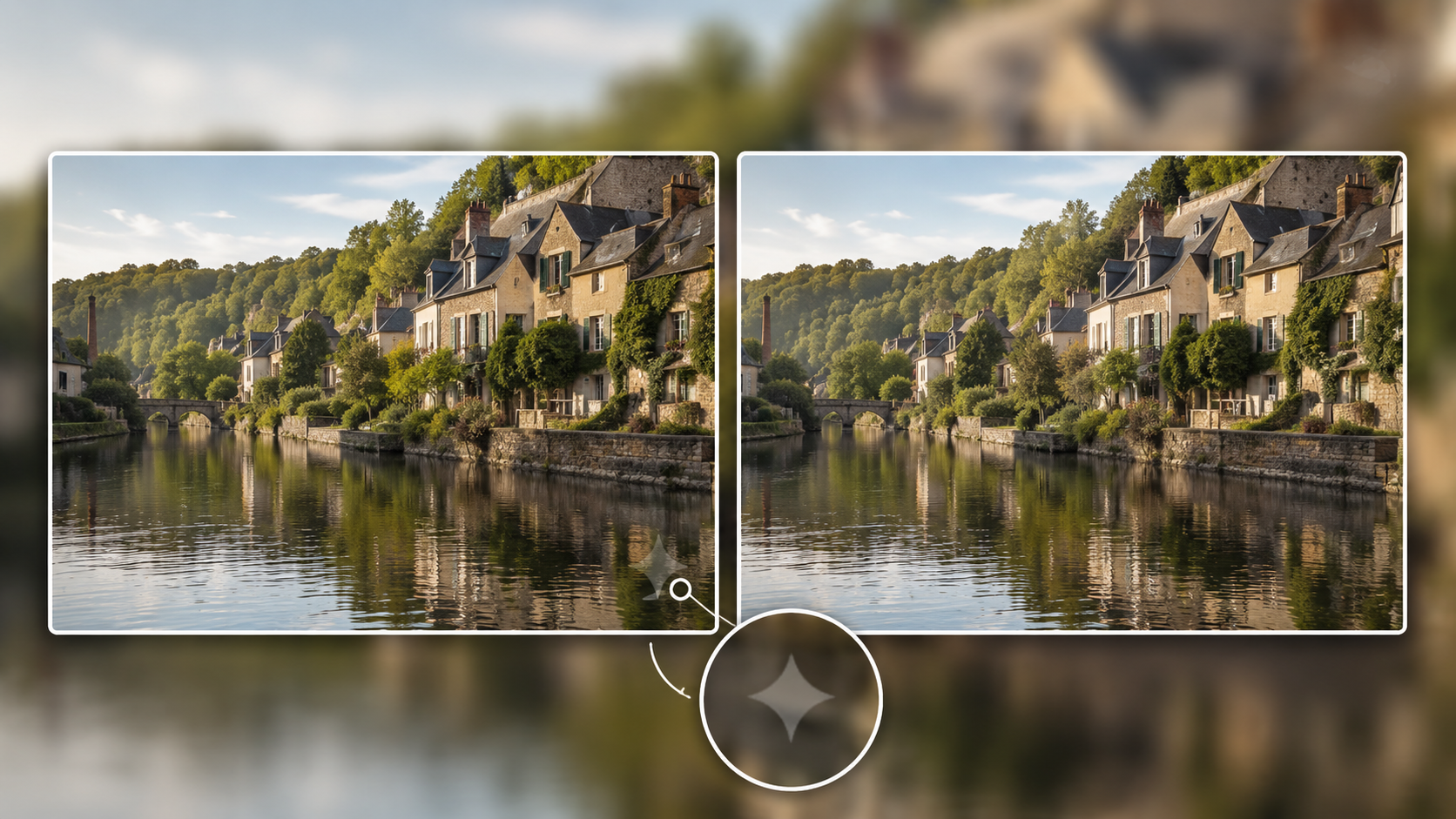
You can remove the Gemini watermark free in under 10 seconds at GeminiErase.site with no uploads, no accounts, and no quality loss. If you generate a stunning piece of art, a marketing mockup, or a project visual using Google AI and find it branded with a distracting logo, you do not need expensive software or tedious manual editing to restore your original image. Our free browser tool processes everything locally on your device to keep your data perfectly secure.
What Is the Gemini Watermark?
Every image generated by the Google Gemini ecosystem, including localized models like Nano Banana, receives a distinct visual signature. Google places a semi-transparent, four-pointed star in the bottom-right corner of your generation. Depending on your original resolution, the system embeds this star as either a 48×48 or 96×96 pixel block. Google does not just stamp it on top as a flat sticker. Instead, it uses a mathematical technique called alpha compositing to blend the opacity of the logo with your underlying pixels.
Google implements this visible marker as a core component of its AI transparency initiatives. The company wants to ensure people easily identify generated media at a glance. While this serves an important public safety purpose, the branded corner logo immediately breaks immersion in professional contexts. Whether you build a UI mockup, pitch a creative concept to a client, or publish a blog post, the watermark remains a severe distraction. That is exactly why utilizing a dedicated Gemini watermark remover is essential for modern creative workflows.
Before you attempt to remove the Gemini AI watermark, you must understand a critical technical distinction regarding how Google tags its files. You must separate visible watermarks from SynthID metadata.
Google applies two entirely separate layers of identification to your generated files. The four-pointed star acts purely as a visual indicator. The second layer, SynthID, functions as an imperceptible, structural pattern woven directly into the spatial frequencies and pixel values of the image itself. SynthID remains entirely invisible to the human eye but allows Google AI verification software to scan it easily. When you remove Gemini watermark online free using a visual restoration tool, you erase the visible star, but you do not destroy the underlying SynthID signature. Your image becomes visually pristine for your audience while technically retaining its underlying cryptographic proof of AI origin. To learn more about how we keep this process entirely client-side, you can review our privacy policy.
3 Methods to Remove the Gemini Watermark in 2026
When you need to clean a Gemini-generated graphic for professional use, you generally choose between three methods. Each approach handles the pixels differently, directly impacting your rendering quality, processing speed, and data privacy.
Method 1: GeminiErase (Free, Browser-Only, 2ms)
GeminiErase uses a highly specialized engineering approach to restore your images. Instead of relying on generative AI to patch over the logo, the core engine executes a deterministic reverse alpha-blending algorithm.
Because Google composites the visible four-pointed star using alpha channels with a known white tint, the system treats the blending process as an equation with a definitive solution. The client-side script evaluates the affected pixels and mathematically subtracts the transparency layer, completely uncovering the original data underneath.
Speed: The algorithm completes the entire calculation in less than 2 milliseconds inside a dedicated Web Worker.
Quality: You get a 99.9% accurate restoration of the original pixel values without any blurry patches or guesswork artifacting.
Privacy: Your file never leaves your computer. The script processes the image data entirely inside your local browser memory via JavaScript, providing absolute data security.
Cost: Free forever with zero signups or account barriers.
Method 2: AI Inpainting Tools
AI inpainting tools utilize generative models to strip elements from an image. You upload your file to an external cloud server, brush over the four-pointed star logo, and wait for a model to generate replacement content.
While this works reasonably well for general object removal on highly complex, unpredictable backgrounds, it fails to deliver a precise cleanup for predictable geometric watermarks.
The Problem: Generative AI does not know what was originally behind the logo; it only guesses based on surrounding texturing.
The Result: This guessing frequently creates visible compression artifacts, muddy textures, or structural distortion. If the watermark sits over fine text, sharp UI borders, or repeating geometric patterns, the AI will warp those lines. Furthermore, uploading sensitive company assets or unreleased mockups to third-party servers raises serious data privacy vulnerabilities.
Method 3: Adobe Photoshop Healing Brush
For graphic designers who already own a Creative Cloud subscription, manual removal using Adobe Photoshop remains a traditional option. You import the graphic, select the Healing Brush or Clone Stamp tool, and manually sample adjacent pixel regions to paint over the branded corner.
The Problem: This process gives you complete, granular control over the edit, but it requires a premium paid license and a steep learning curve for non-designers.
The Result: It turns a repetitive, predictable task into a time-consuming manual chore. Since Google anchors the watermark to very specific pixel margins in the bottom-right corner, editing multiple image assets by hand severely bottlenecks an active production pipeline.
Quick Comparison Matrix
Feature | GeminiErase.site MD | AI Inpainting Tools | Adobe Photoshop |
Processing Speed | Instant (Under 2ms) | Slow (Requires server queues) | Slow (Requires manual brushing) |
Pixel Accuracy | 99.9% Mathematical Reversal | Approximated Guesswork | Manual Human Approximation |
Data Privacy | 100% Secure (Local Browser) | Low (Cloud Upload Required) | High (Local Desktop Software) |
Pricing Model | Completely Free | Freemium (Credits / Paywalls) | Premium Paid Subscription |
What makes GeminiErase the optimal choice?
As established by the project documentation in codebase.md, standard editor tools force you to trade speed for visual quality. By treating watermark removal as a clean reverse mathematical formula rather than an automated guessing game, GeminiErase strips away the corner logo instantly while preserving the pristine fidelity of your original generation.
Step-by-Step: How to Remove the Watermark with GeminiErase
The interactive processing pipeline on our platform runs entirely locally, allowing you to clean your graphics through a fast, automated interface. You do not need to configure complex scripts or mask pixels by hand.
Follow these six simple steps to mathematically restore your image file:
Navigate to the Platform: Open your web browser and go to the GeminiErase tool homepage.
Select Your File: Drag and drop your Gemini-generated image directly into the designated dashed workspace, or click the browse button to choose a PNG, JPG, or WEBP file from your device.
Automatic Pattern Analysis: The client-side script reads the digital layout instantly, triggering our Web Worker to scan the bottom-right quadrant of the file for the 48×48 or 96×96 pixel star block.
Review the Box Target: The system outlines the verified watermark region with a sharp red box on your screen, confirming exactly where the algorithm will perform the reversal.
Execute Pixel Reversal: Click the Remove Watermark button. The script solves the alpha-compositing equation in under 2 milliseconds, restoring the exact underlying pixel data.
Download Your Graphic: Review the pristine before-and-after comparison frame and click Download Verified PNG to save your clean, unbranded asset.
🔒 Strict Client-Side Privacy Note
As detailed in the project structure of
codebase.md, the platform does not include any server-side upload or storage pipelines for your media. When you select an image, a localFileReaderdecodes the file bytes directly into your browser's canvas memory. The binary data transfers straight into a local Web Worker thread, meaning your sensitive images never leave your machine or cross the network.
Gemini Watermark vs. SynthID: What Stays, What Goes?Google applies two distinct layers of watermarking to its AI generations. The first layer is the visible four-pointed star logo. This visual layer is a surface-level modification that our algorithm cleanly reverses.
The second layer is Google SynthID. SynthID is a sophisticated, imperceptible digital watermark embedded directly into the pixel metadata and the frequency space of the image itself. It is completely invisible to the human eye.
When you run an image through the GeminiErase tool, the system targets and removes only the visible star overlay. The mathematical reverse-blending process does not strip or alter the underlying SynthID. This selective removal process is highly intentional. It means your image becomes visually flawless for your presentations, mockups, or digital content, while the file itself remains responsibly identifiable by AI detection software if ever required. You get the clean aesthetic you need without destroying the cryptographic proof of origin.
Does It Work on Nano Banana Images?
In 2026, localized on-device AI generation has become the new standard. Frameworks like Nano Banana operate directly on mobile hardware to produce high-quality media without requiring constant cloud connectivity.
A common technical question is whether browser-based removal tools can handle these localized generations. Even when generating images locally, these mobile models still output standard visible markers. Because the GeminiErase Web Worker relies on a dynamic, multi-scale pyramidal scanning algorithm, it handles these localized generations perfectly. The detection engine utilizes adaptive scaling to evaluate the localized contrast and brightness of the image.
Whether your image originates from a massive cloud-based data center or an on-device Nano Banana architecture, our reverse alpha-blending logic detects the exact opacity layer. The algorithm seamlessly solves the transparency equation and recovers the original pixels underneath the logo. You maintain your high-resolution quality, regardless of which specific Gemini ecosystem model generated the file.
Frequently Asked Questions
What is the fastest way to remove Gemini watermark online free?
Using GeminiErase is the fastest method available. The tool uses a deterministic reverse alpha-blending algorithm that processes and cleans your image completely in under 2 milliseconds directly within your web browser.
Does this remove SynthID or only the visible Gemini watermark?
This tool removes only the visible four-pointed star watermark from your image. It does not modify, strip, or alter the invisible SynthID pixel metadata layer, meaning the underlying cryptographic proof of AI origin stays intact.
Is my image uploaded to a server?
No, your image is never uploaded to an external server. The platform runs entirely on client-side JavaScript, which means a local Web Worker decodes and corrects the pixels directly in your browser's secure memory.
Which image format gives the best result?
Uploading the original image in PNG format yields the highest quality results. Because our tool reverses a precise mathematical compositing formula, uploading an uncompressed file directly downloaded from Gemini ensures a flawless calculation.
Can I use the cleaned image commercially?
The watermark removal process itself is entirely free and unrestricted. However, you must comply with Google Gemini's licensing and terms of service regarding commercial usage rights for AI-generated assets before publishing.
Conclusion
A branded corner logo should not stand in the way of a professional presentation or creative workflow. While standard AI editing tools force you to accept blurry guesswork or slow cloud queues, GeminiErase fixes the root problem mathematically. By deploying a local reverse alpha-blending engine, the tool uncovers the exact original image data without altering the file's responsible AI origins.
Remove your visible Gemini watermark now with GeminiErase free, browser-only, no signup. Give your digital mockups, artwork, and marketing assets the polished, production-ready finish they deserve instantly.