What Is the Gemini Sparkle? The 4-Pointed Star AI Logo Explained
What Is the Gemini Sparkle Watermark? The 4-Pointed Star AI Logo Explained (2026)
The Gemini sparkle watermark is the visible four-pointed star Google places on many consumer Gemini-generated images to show they were created with Google AI. It is a visual AI disclosure mark, not the same as SynthID. SynthID is invisible forensic watermarking, while the sparkle is a visible pixel overlay that can be removed from the image surface.
What Exactly Is the Gemini Sparkle?
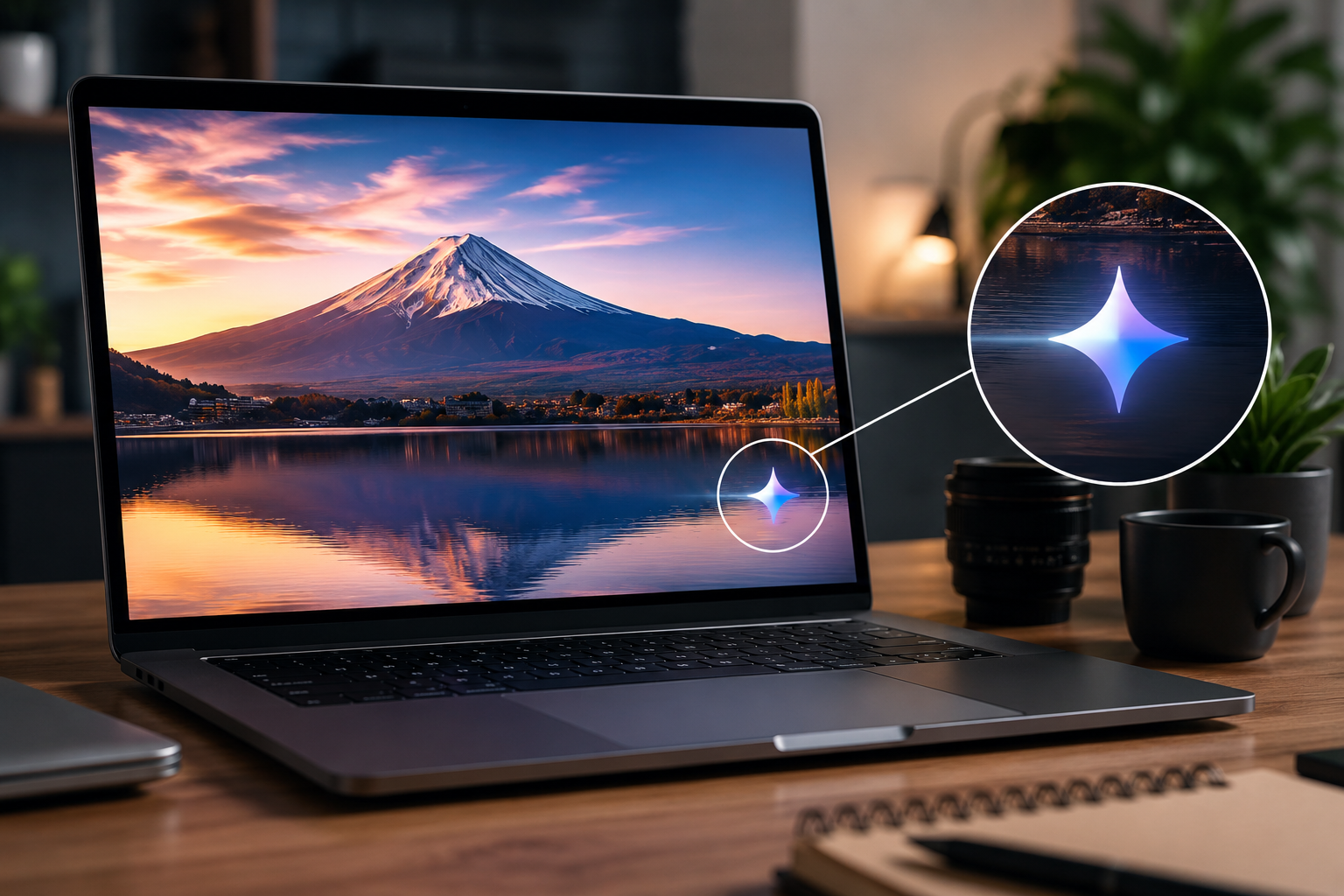
The Gemini sparkle is the small star-shaped mark you see on images created or edited with Google Gemini image tools. In practice, it works like a visible watermark: it sits directly on top of the image pixels and signals that the image came from Google AI.
Google refers to this visible mark as the “Gemini sparkle” in its Nano Banana Pro transparency notes. Users describe it in many different ways: a glowing star, a four-pointed logo, an AI glint, a Gemini logo, or a watermark on the bottom-right of the image.
That difference in wording matters for search. Someone who types “what is the Gemini sparkle” is usually asking the same thing as someone who searches “what does the Gemini star mean on images.”
Visual description: the asymmetric four-pointed star
The Gemini sparkle looks like an asymmetric four-pointed star. It usually appears as a bright glint with one longer vertical axis, a shorter horizontal axis, and soft glow edges around the shape.
It is not a text watermark. It does not say “AI generated” or “Made with Gemini.” Instead, Google uses the icon itself as a compact visual signal.
Because the sparkle is rendered into the final exported pixels, it becomes part of the image file. If you zoom into the affected area, you can see the watermark’s semi-transparent edges blended into the background.
Why Google calls it the “sparkle” or “AI glint”
Google’s AI products often use sparkle-style iconography to represent generative AI features. The same visual language appears across editing tools, assistant features, and image generation interfaces.
The word “sparkle” also fits the mark’s function. It is meant to be visible without covering much of the artwork. It catches attention, but it does not behave like a large stock photo watermark across the center of the image.
For users, the problem is practical. A small sparkle may still interfere with product mockups, social posts, portfolio images, presentation graphics, or client previews. That is why the phrase Gemini sparkle watermark has become a useful way to describe it.
Where it appears on consumer Gemini images
The Gemini sparkle most commonly appears near the bottom-right corner of consumer-generated images. On square images, it usually sits close to the lower-right edge. On cropped or resized exports, the exact visual position can shift relative to the final frame.
As of June 2026, Google says it maintains a visible watermark on images generated by free and Google AI Pro tier users. Google also says it removes the visible watermark for Google AI Ultra subscribers and within the Google AI Studio developer tool.
GeminiErase is built for cases where the visible sparkle is present. It does not depend on guessing, brushing, or repainting the area manually.
Why Did Google Put a Sparkle on My Image?
Google puts the sparkle on many Gemini-generated images to make AI origin easier to recognize. The mark works as a human-visible transparency signal, while SynthID works as an invisible verification layer. Together, they help viewers, platforms, and creators identify content made or edited with Google AI.
AI transparency rules are becoming stricter in 2026
AI image labeling is no longer just a platform preference. It is part of a wider regulatory shift.
The EU AI Act Article 50 transparency obligations apply from August 2, 2026 and address marking, detection, and labeling of AI-generated or manipulated content. California’s SB 942, known as the California AI Transparency Act, became operative on January 1, 2026 and applies to covered generative AI providers with over 1,000,000 monthly users or visitors in California.
SB 942 also distinguishes between “manifest” disclosures, which are easily perceived by a person, and “latent” disclosures, which are present but not directly visible. That distinction maps closely to the public conversation around the Gemini sparkle and SynthID.
The sparkle is visible. SynthID is latent.
The sparkle works as a visual context flag
AI-generated images often leave the environment where they were created. A Gemini image may be downloaded, compressed, posted on social media, inserted into a pitch deck, sent to a client, or cropped into an ad.
Once that happens, the original prompt, app interface, and generation history are no longer visible. The sparkle gives viewers a quick visual clue that the image has an AI origin.
This is especially important when an image looks realistic. A viewer may not know whether an image is photography, digital art, AI generation, or a composite. A small visual mark helps preserve context after the file moves across platforms.
The sparkle also supports Google’s AI brand identity
The Gemini sparkle is also a brand signal. It connects the image back to Google’s AI ecosystem in the same way app watermarks identify content from design tools, camera apps, or social platforms.
That does not mean the sparkle is only decorative. Google’s own wording places it in a transparency context. The visible mark makes Google AI-generated images easier to detect, while invisible watermarking supports deeper verification.
For creators, this creates a tension. The mark improves public transparency, but it can reduce visual cleanliness when the image is used in legitimate design workflows.
The Sparkle vs SynthID: Two Very Different Technologies
The Gemini sparkle and SynthID are not the same thing. The sparkle is a visible graphic overlay blended into the image pixels. SynthID is an invisible digital watermark that Google uses to help verify whether content was created or edited by Google AI models.
The sparkle is visible to humans
The sparkle is visible because it changes the pixels you can see. It is a semi-transparent mark composited over the final image.
That makes it similar to a traditional visible watermark, but smaller and more symbolic. It can be noticed, cropped out, compressed, or mathematically reversed when the watermark shape and alpha behavior are known.
GeminiErase focuses only on this visible layer. It detects the sparkle block and reverses the blending math used to apply it.
SynthID is invisible forensic watermarking
SynthID works differently. Google DeepMind describes SynthID as a tool that embeds digital watermarks directly into AI-generated content. These watermarks are imperceptible to humans but detectable by SynthID technology.
Google’s Gemini verification help page also explains that Gemini uses SynthID to determine whether images, videos, or audio were generated or edited by Google’s AI models. Content Credentials are separate and act more like a digital passport for origin and editing history.
GeminiErase does not remove SynthID. That is intentional. The tool is designed for visible sparkle cleanup, not for bypassing forensic AI provenance systems.
Comparison table: Gemini sparkle vs SynthID
Feature | Gemini sparkle | SynthID |
|---|---|---|
Visibility | Visible to humans | Invisible to humans |
Common appearance | Four-pointed star logo | No visible appearance |
Purpose | Visual AI disclosure and brand signal | AI content verification |
Where it exists | On top of image pixels | Embedded into generated content |
Can users see it? | Yes | No |
Can GeminiErase remove it? | Yes, when the visible sparkle is detected | No |
Best description | Visible watermark | Invisible forensic watermark |
This distinction is the most important point in the article. Removing the visible sparkle does not erase SynthID, does not remove all provenance signals, and does not automatically change your disclosure obligations.
For a deeper technical comparison, read Gemini watermark vs SynthID.
Does Every Gemini Image Have the Gemini Sparkle Watermark?
Not every Gemini image has the visible sparkle. Google says free and Google AI Pro tier users receive the visible Gemini sparkle on generated images, while Google AI Ultra subscribers and Google AI Studio developer outputs do not receive the visible watermark in the same way. SynthID can still apply invisibly.
Consumer Gemini images usually include the visible sparkle
If you generate images through the consumer Gemini app or standard consumer Gemini experience, the visible sparkle is likely to appear unless your account tier or workflow qualifies for watermark-free output.
This is why casual users often discover the mark after downloading their first Gemini image. They did not add a logo manually. The mark is applied automatically as part of Google’s output policy for many consumer generations.
The visible sparkle is especially common in images generated from Nano Banana, also known as Gemini 2.5 Flash Image, and Nano Banana Pro, also known as Gemini 3 Pro Image.
Google AI Ultra subscribers may not receive the visible sparkle
Google’s Nano Banana Pro transparency notes state that the visible watermark is removed from images generated by Google AI Ultra subscribers. The reason Google gives is professional workflow quality: creators, marketers, designers, and production teams often need a clean visual canvas.
That does not mean the image has no AI provenance. Google states that media generated by its tools are embedded with SynthID, the imperceptible digital watermark.
So Ultra output can be visually clean while still carrying invisible AI-origin signals.
API and developer image outputs are handled differently
Developer workflows are not the same as consumer app workflows. Google states that the visible watermark is removed within the Google AI Studio developer tool.
This matters because developers often generate image assets inside automated pipelines, product prototypes, enterprise apps, or creative tools where a visible logo could break the final layout.
A developer output may still be subject to SynthID, Content Credentials, API policies, platform rules, or disclosure requirements. The absence of the visible sparkle does not mean the image is unmarked in every technical or legal sense.
Imagen 4 is different from Gemini image output
Imagen 4 uses a different output path from Gemini’s visible sparkle behavior. Google’s Imagen 4 developer announcement states that Imagen 4 images continue to include a non-visible digital SynthID watermark.
That means users should not expect the same four-pointed Gemini star on every Google AI image. Gemini image generation and Imagen generation can have different visible marking behavior, even when both are part of Google’s AI ecosystem.
How to Remove the Gemini Sparkle from Your Image
You can remove the visible Gemini sparkle with GeminiErase by processing the image directly in your browser. GeminiErase detects the sparkle, reverses the alpha blending math, and restores the affected pixels without uploading your image to a server or using AI inpainting.
GeminiErase removes the sparkle with reverse alpha blending
GeminiErase does not repaint the watermark area with AI. It does not generate replacement pixels. It uses deterministic reverse alpha blending.
When Google places the sparkle over an image, the visible pixel you see is a blend of two things: the original background pixel and the semi-transparent watermark pixel. The compositing equation is:
B = (C − (α × W)) / (1 − α)
In that formula:
B is the recovered background pixel.
C is the composited pixel you see in the watermarked image.
α is the watermark alpha transparency.
W is the watermark pixel value.
Because the sparkle follows a known alpha profile, GeminiErase can reverse the compositing math instead of guessing what should be underneath. This is why the result can be up to 99.9% pixel-accurate when the original watermark profile is intact.
For a full technical explanation, read reverse alpha blending for the Gemini watermark.
The process runs locally in your browser
GeminiErase runs entirely in your browser using JavaScript Canvas API, Web Workers, and Float32Array processing.
That architecture matters for privacy. Your image is not uploaded to GeminiErase servers. You do not need an account. You do not need to sign up. The tool supports PNG, JPG, and WEBP files up to 15MB.
Processing completes in under 2 milliseconds on typical supported images because the operation is mathematical, not generative.
Step-by-step: remove the Gemini sparkle with GeminiErase
Select your PNG, JPG, or WEBP image with the visible Gemini sparkle.
GeminiErase scans the image locally using Normalised Cross-Correlation pyramid detection.
The tool checks for supported 48×48 and 96×96 pixel sparkle blocks.
GeminiErase applies reverse alpha blending with Float32Array precision.
Preview the cleaned result in your browser.
Download the final image without creating an account or uploading the file.
This workflow is designed for legitimate visual cleanup. It is not designed to remove SynthID or erase every form of AI provenance.
When removal accuracy is highest and when artifacts can appear
GeminiErase works best when the visible sparkle is intact and the image has not been heavily compressed. PNG usually produces the cleanest result because it preserves exact pixel values. High-quality WebP also performs well.
JPEG can still work, but heavy compression may introduce small artifacts. Compression changes pixel values around the sparkle, which means the original compositing math no longer matches perfectly.
If you have the choice, process the highest-quality version of the Gemini image you downloaded.
Mid-post CTA: Clean the visible star without uploading your image. Use GeminiErase to remove the Gemini sparkle privately, free, instant, and no account required.
What GeminiErase Cannot Remove
GeminiErase is purpose-built for the visible Gemini sparkle. It does not remove every watermark, every AI label, or every legal disclosure requirement. That limitation is important because it keeps the tool precise, honest, and predictable.
GeminiErase does not remove SynthID
GeminiErase does not remove SynthID. SynthID remains intact after processing.
The tool only targets the visible four-pointed sparkle overlay. SynthID is an invisible watermarking system embedded differently and designed for AI verification. Removing a visible logo from the surface of an image does not remove invisible forensic watermarking.
This is by design.
GeminiErase does not remove non-Gemini watermarks
GeminiErase is not a general stock-photo watermark remover. It is not built for Getty-style overlays, creator signatures, marketplace logos, app badges, TikTok marks, Instagram labels, or random brand graphics.
Those marks use different shapes, alpha behavior, placement rules, and pixel patterns. GeminiErase is optimized for the specific Gemini sparkle profile, not unrelated watermarks.
Removing the sparkle does not remove disclosure obligations
Removing the visible sparkle does not automatically remove your responsibility to disclose AI-generated content.
EU AI Act Article 50, California SB 942, platform rules, client contracts, advertising standards, and editorial policies may still apply depending on where and how you use the image.
This content is for informational purposes only and does not constitute legal advice. Consult a legal professional for your specific situation.
For more detail, read is it legal to remove the Gemini watermark.
Should You Remove the Gemini Sparkle?
You should remove the Gemini sparkle only when you have a legitimate reason to clean the visual canvas and you still follow any relevant AI disclosure rules. The best workflow is to treat removal as image cleanup, not as a way to hide AI origin where disclosure is required.
Legitimate reasons to remove the sparkle
There are practical cases where removing the visible sparkle makes sense:
Portfolio mockups where the mark distracts from layout review
Internal drafts and concept art
Product design previews
Social media crops where the mark clashes with text or branding
Client presentation slides
Website hero image tests
App UI mockups
Creative experiments where the mark sits over an important detail
In these cases, the visible mark can interfere with composition even when there is no intent to mislead.
When you should keep or disclose AI origin
You should be more careful when the image is public, commercial, political, journalistic, educational, medical, legal, or used in a regulated context.
Some platforms require AI disclosure. Some clients require source transparency. Some laws focus on whether people can understand that content was AI-generated or manipulated.
The safe rule is simple: removing the visible sparkle does not mean you should hide AI origin where disclosure is expected.
The safest workflow for creators and marketers
Keep the original Gemini file. Save the cleaned version separately. Document which tool generated the image and when. Use GeminiErase for visual cleanup, not for provenance removal.
If the image goes into advertising, public communication, or client work, check the relevant platform and legal disclosure rules before publishing.
That workflow gives you a cleaner image while preserving responsible process documentation.
Conclusion: What the Gemini Sparkle Means for Your Image
The Gemini sparkle is Google’s visible four-pointed star watermark for many consumer Gemini AI images. It exists to make AI-generated content easier to recognize, especially after images are downloaded and shared outside Gemini.
It is not the same as SynthID. The sparkle is visible and can be mathematically removed from supported images. SynthID is invisible and remains intact after GeminiErase processing.
For clean visual output, use GeminiErase to remove the visible Gemini sparkle. Your image stays in your browser, processing takes under 2 milliseconds, and no signup is required.
This post reflects information available as of June 2026. Google’s product roadmap and watermarking policies may change.
FAQ: Gemini Sparkle Questions
What is the Gemini sparkle watermark?
The Gemini sparkle watermark is the visible four-pointed star Google places on many Gemini-generated images. It signals that the image was created or edited with Google AI. The mark usually appears near the bottom-right corner and is separate from SynthID, Google’s invisible AI verification watermark.
Is the Gemini sparkle the same as a watermark?
Yes, the Gemini sparkle functions as a visible watermark because it is placed over the image pixels. It is not the same as SynthID. The sparkle is visible to humans, while SynthID is an invisible digital watermark used to help verify whether content was generated or edited by Google AI.
Can I turn off the Gemini sparkle in Gemini?
Most free and Google AI Pro users cannot manually turn off the visible Gemini sparkle in consumer image generation. Google says the visible watermark is removed for Google AI Ultra subscribers and within the Google AI Studio developer tool. Availability can change, so check your current Gemini plan and workflow.
Does removing the Gemini sparkle affect image quality?
Removing the sparkle with GeminiErase is designed to preserve image quality because it uses reverse alpha blending instead of AI inpainting. Results are strongest on PNG and high-quality WebP files. Heavily compressed JPEG images may show small artifacts because compression changes the watermark pixels before processing.
Is there a sparkle on Gemini 3 Pro Image or Nano Banana Pro images?
Yes, Nano Banana Pro, also known as Gemini 3 Pro Image, can show the visible sparkle for free and Google AI Pro tier users. Google says the visible watermark is removed for Google AI Ultra subscribers and Google AI Studio developer workflows, while SynthID remains part of Google’s AI transparency system.
Does GeminiErase remove SynthID too?
No. GeminiErase does not remove SynthID. It removes only the visible Gemini sparkle watermark when the supported sparkle pattern is detected. SynthID is an invisible digital watermark used for AI verification, and it remains intact after the visible sparkle is processed.
Is it legal to remove the Gemini sparkle watermark?
Legality depends on your jurisdiction, use case, platform rules, client requirements, and disclosure obligations. Removing the visible sparkle does not automatically remove the need to disclose AI-generated content under rules such as EU AI Act Article 50 or California SB 942. Consult a legal professional for specific advice.
How is GeminiErase different from AI watermark removers?
GeminiErase does not use AI inpainting or generative guessing. It uses deterministic reverse alpha blending to recover the original background pixels under the visible sparkle. That makes it more precise for supported Gemini sparkle images, but also more specialized than general-purpose watermark removal tools.